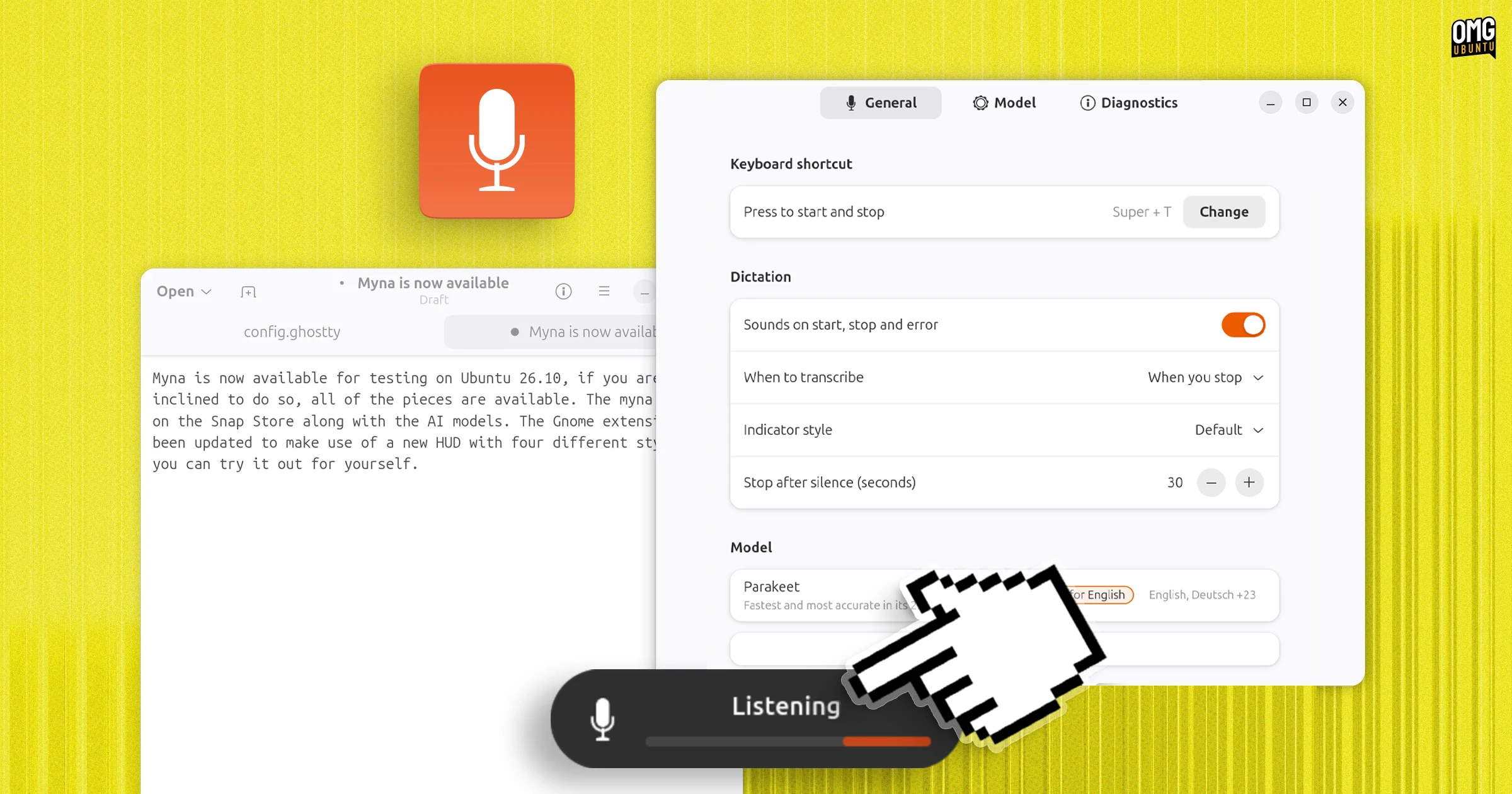
Canonical recently added the Myna orchestrator snap and speech-recognition AI models to the Snap Store, and made a new desktop Myna Settings tool available to install from a PPA.
Ubuntu 26.10 also comes with another component preinstalled, as the gnome-shell-ubuntu-extensions package has a GNOME Shell extension that triggers an on-screen HUD when the Myna local AI speech-to-text tech is listening or transcribing.
While a formal call for testing hasn’t been made, all the pieces needed to test Myna are available – for those who care to put them together. The feature has changed quite a bit since I previewed it back in August.
If that includes you, read on for how to do it – but don’t expect things to work perfectly just yet, mind.
How to try Myna on Ubuntu
To test Myna on Ubuntu 26.04 LTS or Ubuntu 26.10 you need:
myna-config desktop app from a PPA
myna snap from the Snap Store
myna-* AI model from the Snap Store
If you’re on Ubuntu 26.10 you also have:
Myna Shell extension (preinstalled)
As of writing, the Myna Shell extension (which triggers the on-screen HUD) is only packaged for GNOME 51 and 26.10. Desktop notifications are used to convey status on Ubuntu 26.04 instead.
The on-screen HUD will only appear after pressing the trigger key to activate Myna, when listening or transcribing, or conveying error states (like ‘background noise is high’ or ‘focus lost’).
There are different visual styles available for the HUD: default (a plain bar using the system accent colour); vumeter (think volume) and ribbon (but as animated as the original one, alas).
Update: the latest update to Myna Settings only includes 2 options: Default and Vumeter.
Here’s how to install each component. Installing the Myna Settings desktop app The Myna Settings app for Ubuntu
Install the Myna Settings app by adding the following PPA (maintained by a Canonical engineer working on Myna) which provides packages for Ubuntu 26.04 LTS and 26.10:
sudo add-apt-repository ppa:charles05/myna-config
sudo apt install myna-config
Installing the Myna client snap
Enable an experimental snap feature Myna requires before it will install:
sudo snap set system experimental.user-daemons=true
Install the Myna speech-to-text client from the Snap store:
sudo snap install myna --edge
Installing a text-to-speech AI model snap The first-run wizard doesn’t work (yet)
Finally, to tie it all together, you’ll need the “brains” of the operation: an AI model which will actually transcribe your audio to typed text.
The Myna Settings (myna-confg) app has a first-run wizard to install the various components, and this suggests a model suitable for your hardware.
You’ll can also install your preferred speech recognition model from the Snap Store via the command-line – but which one should you choose?
Whisper, Parakeet and Funasr are the AI models on the Snap Store. The models run entirely locally, on your device, but aren’t small. You’ll need 1-2GB of free disk space1, depending on the one you choose.
I tested two. Parakeet I found better at accuracy (even spelling my surname correctly, which most don’t), but Whisper seemed faster, if prone to homophone errors.
Install Parakeet, NVIDIA’s fast, open-weight ASR model supporting 25 languages and punctuation:
sudo snap install myna-parakeet --edge
Or install Whisper, OpenAI’s multilingual, open-source model:
sudo snap install myna-whisper --edge
Or install Funasr:
sudo snap install myna-funasr --edge
Now, open Myna Settings and it should now skip past the setup screen and show you options. Backend settings
You can, via the Myna Settings tool, set a model size (the number of parameters it uses) to favour speed or accuracy: smaller variants process audio faster on low-end hardware, while larger ones reduce transcription errors and handle tricky words better.
Checking Myna works
With everything in place, you can go ahead and test. First thing: make sure your microphone is enabled and working (check in Settings > Sound > Input). You then need to assigned a hotkey shortcut in the settings app2 which you will press to activate the feature.
When ready, open an app and focus a text field (I tend to use Text Editor), and press your hotkey.
When activated, the Myna HUD will appear on the desktop (26.10) or in a notification (26.04). Begin to talk and, if Myna says “listening”, continue rambling until you’re done. Press the same hotkey to transcribe your spoken words in to text that will appear in the focused app.
If you click out of the text field you began dictating into (or another app opens and steals focus) the HUD will say “focus lost”. You’ll need to repeat the process again.
Is Myna any good?
Myna is a boon to Ubuntu’s accessibility, for sure. Offline AI-powered dictation that’s more accurate than what’s previously been available.
Whether dictation proves popular beyond that, in day-to-day usage, is an open question. Offline speech recognition has shipped on smartphones and smartwatch for years, but most people still type their WhatsApp messages, e-mails and (welp) ChatGPT prompts.
Dictation is remains best suited to longer-form text entry than, say, barking “Firefox” at the App Picker. Myna can lose focus easily (an app opens, you press a button, you mouse away), and thus lose any “spiel” it was in the middle of processing.
It’s also optional; it only “listens” when you press a button, and recorded clips never leave your device nor get stored on it. It also can’t be triggered with a “hey myna” – not yet anyway.
Ubuntu didn’t have any of this before Myna, so it’s great to see Canonical experimenting. Myna is even being developed as a desktop-agnostic tech, even if this first pass focuses on a GNOME/Wayland/Mutter stack.
Snap is configured to keep one “good” backup of everything you install, so when it gets updated the only one stays behind, meaning each snap uses twice the amount of space. ↩︎
On one of my laptops Myna defaults to super + j but on another it uses super + t. You can see/change it in the Myna Settings app. ↩︎
Unfortunately if your post mentions usage of AI Lemmings act like rabid reactionaries and become as bad as the most enthusiastic AI bros. Sorry your post is overshadowed by this issue.
Lol, what kind of Reddit logic is that? AI is crap, and I’m just sharing what kind of crap Canonical is shitting now. Don’t worry about my invisible Internet points.
Oh that’s pretty funny
Snap and AI in one post. Is this ragebait?
Will they then then replace everything with AI, gradually, including the calculator, image viewer, video player, browser?
No, I will never want AI in my machine pre-installed, even remotely.
I’ll always prefer deterministic and accurate, transparent.
There are stable synthetic narrators already with no AI.
Those who like AI, may install AI.
No, fudge it. Delete it dead.

People with disabilities don’t deserve accessibility?
What does that have to do with AI? We already had tools for that before AI, and they are probably more accurate
No, you didn’t. Not for Ubuntu at least. And even if you did why would you want to stop the development of new and possibly better ones?
But this is just anti-ai puritanism. Just screw people for whom this could be useful because “ai”.
If it’s better sure, but i just haven’t seen genAI doing anything that’s better than what we already had. I saw some replies talking about neural networks, but i was obviously referring to the newer iteration of LLM slop that we’re seeing now, and that has been nothing but problematic. I don’t think you can blame me for wanting it all to go away when i’ve seen everything around me turn to shit because of this tech. There’s more negatives than positives.
“But accessibility!” is the only humane face “AI” boosters can come up with to defend the clankers. Except they don’t realise it’s more like the scene in Silence of the lambs where Hannibal is wearing a guard’s face like a mask.
The first speech recognition was introduced 1952, while AI was established as a field of research in 1956, so you are technically correct :) Back when I studied computer science at university, both speech and image recognition was considered AI, but I assume you’re thinking about more recent AI technologies. According to the Computer History Museum it was only using deep neural networks that computers finally could match the accuracy of a human, so pre-AI tools were definitely much less accurate.
It’s the same thing it’s always been. Since the early 2010s we’ve been using neural networks to do voice transcription. They just decided in the last five years that neural networks = AI (so they can get the investor dollars). But voice recognition is basically a solved problem, and that solution was neutral networks. Has been since the late 90s, with ANNs and then RNNs.
Same with language translation. Google Translate started using NMT in 2016.
Of course they do, absolutely.
If it helps/supports/carries a disabled/invalid miraculous Individual, Person, Human to express themselves better, communicate easier, feel themselves more humane and alive, please do install and try it!
Yet, at this point, I do not believe AI-driven tools for disability should be installed by default to everyone, as if suggesting all people are too disabled by default.
Healthy People should be proud and appreciate they are not, and do get yourself together, and do better. We deserve to be better.
Here, I do get what I mean, since I am myself physically mute, a car accident, which I rarely expose but recently mentioned:
- https://gist.github.com/serious-angel/738ff60d2cab20ae35c02fd6d0499047 (Lobsters staff ruined my reputation, do not respond, and I have no idea why…)The mute trait is quite a challenge… and one of these is being constantly called out as “AI” or “bot” for my formatting or effort/time I invest into textual messages, I believe, in hope to stay more social…
The most recent example at Lemmy:
- https://lemmy.world/comment/26100133 (You’d think at these days, with so much of awful LLM/“AI”/noise, a dear humane attitude should prevail…)
Not just no but Fuck No.
This is standard on all phones and macs. Glad that speech to text is now available on Linux. Wish they didn’t call it AI…
is ubuntu, is ai
Boy, who ever posted this to lemmy does not understand the audience.
Lol, what kind of Reddit logic is that? AI is crap, and I’m just sharing what kind of crap Canonical is shitting now. Don’t worry about my invisible Internet points.
How to avoid using the ai built in Ubuntu ? Just switch to a better distro.
Nope, ubuntu need to change their name.